


Tracking macros can feel super overwhelming at first. With many nutrition apps, zeroing in on the right one for your goals isn’t easy. Macrofactor vs Carbon is one of the most popular comparisons among Macros Tracking Apps. Both apps have their loyal followers, and for good reason, they both help you track your macros, and do it well. This article will help you break down the differences between Macrofactor and Carbon to find the best fit for your lifestyle, so you can confidently reach your nutrition goals without second-guessing your approach. Additionally we will also touch upon how to hit your macros?
Goldi AI’s calorie tracker helps you track your nutrition and macros for better health and fitness. They can help you lose fat or gain muscle, with personalized approaches that adapt as you progress.
What is MacroFactor?
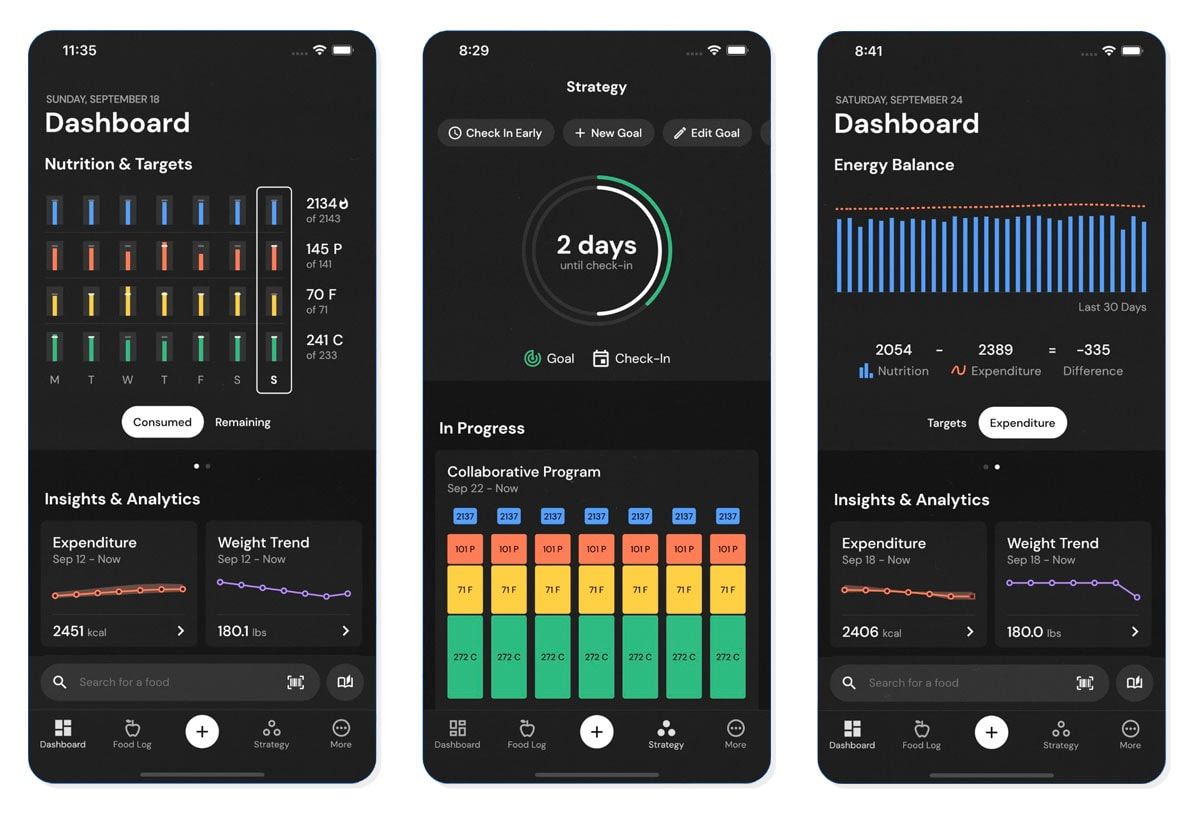
MacroFactor is a macro tracking app designed to help users manage their nutrition. The app is known for its accuracy, which it achieves through a sophisticated algorithm that learns about the user over time to provide personalized nutrition recommendations. MacroFactor stands out among its competitors by prioritizing user consistency over perfection.
Instead of penalizing users for missing targets, MacroFactor adjusts their goals based on performance and encourages them to keep tracking their intake.
How Does MacroFactor Work?
Like most nutrition apps, MacroFactor starts with a questionnaire that gathers information about the user’s age, gender, physical size, and activity level. Next, it prompts users to set macro targets based on their goals and preferences. From there, the app encourages users to track their:
- Food intake
- Body weight
- Body fat percentage
AI-Driven Optimization for Personalized Goals
MacroFactor uses this data to assess whether the user’s nutritional targets are accurate or if adjustments are needed to keep them on track with their goals. Within a couple of weeks, the app will have a much deeper understanding of the user’s needs, and its recommendations will become increasingly accurate, so they won’t have to think about their nutrition.
What Are the Benefits of Using MacroFactor?
The most significant benefits of MacroFactor are its speed and accuracy. It’s known as one of the fastest food loggers on the market, allowing users to log their meals with minimal interruption to their day. In addition, MacroFactor has a unique coaching style that gathers data to understand the user better and provide accurate recommendations.
There are three different coaching styles, allowing for some customizability regarding goals, progression rate, and more.
What is Carbon Diet Coach?

Carbon Diet Coach is a calorie and macronutrient tracking app that provides accurate targets and re-evaluates them weekly to keep you on track to reaching your goals. The Cardon Diet Coach App was created by Dr. Layne Norton (Ph.D. in nutritional sciences) and Registered Dietitian Keith Kraker (BS in nutrition and dietetics).
The Core Functionality of Carbon Diet Coach
Carbon Diet Coach focuses on calories and macros, which differs from many other food-logging apps that generally prioritize calories or macros. When you sign up and choose your subscription option (there is no free trial), the app asks about your goals (fat loss, muscle gain, maintenance, or a reverse diet), age, gender, activity level, etc.
Using this data, it calculates your nutritional needs. It re-evaluates them weekly based on your adherence and rate of progress.
Features of Carbon Diet Coach
During a weekly check-in, the app asks users if they adhere to their targets. If they do, the app uses the data collected to determine whether to make changes. If they do not, the app does not change anything; it simply tells the user to be more adherent.
The Pros and Cons of Carbon Diet Coach
Pros
- Accurate nutritional recommendations and weekly updates
- Simple and intuitive interface that doesn’t take long to figure out
- Comprehensive food database
Cons
- There’s no free version or a free trial
- Will not update recommendations unless you are adherent
This could be viewed as a “pro” in some situations, but considering MacroFactor doesn’t require perfection and works based on what the user is capable of, we think it a “con.”
MacroFactor vs. Carbon Diet Coach

Food Database
MacroFactor features a rich and accurate food database with verified entries and in-depth nutritional breakdowns.
Carbon Diet Coach also has a detailed food database, but it mainly includes basic nutritional information.
Our Interpretation: MacroFactor is better in this category due to the higher quality and depth of its verified nutritional data.
Tracking Capabilities
MacroFactor tracks a wide range of metrics: calories, macros, fiber, vitamins, minerals, activity level, body measures, body weight, body fat, weight trends, and progress photos.
Carbon Diet Coach tracks calories, macros, body weight and fat, and lean body mass.
Our Interpretation: MacroFactor offers superior tracking capabilities, giving users a more holistic view of their nutrition and physical progress.
Calorie Recommendations
MacroFactor provides accurate initial recommendations and adjusts them based on user input. It’s flexible and doesn’t expect perfection.
Carbon Diet Coach also offers strong initial recommendations and updates targets as needed, but it expects strict adherence.
Our Interpretation: While both apps offer accuracy, MacroFactor is more adaptable, making it easier for users to stay consistent.
Level of Customization
MacroFactor lets users personalize their nutritional targets, weekly calorie distribution, protein intake, weight goals, and more.
Carbon Diet Coach allows customization of calorie and macro targets when needed.
Our Interpretation: MacroFactor has the edge thanks to its broader customization options, which allow for greater flexibility.
Educational Opportunities
MacroFactor isn’t designed as an educational app, but it still helps users learn about topics like protein needs, weight change rates, and calorie dynamics. Carbon Diet Coach provides learning through daily use, especially around food calories and macronutrients.
Our Interpretation: Both apps offer educational benefits, but MacroFactor includes more built-in explanations and learning opportunities.
Coaching
MacroFactor acts as a nutrition coach by adjusting calorie and macronutrient targets based on input data.
Carbon Diet Coach also adapts targets using user data like weight and body fat percentage.
Our Interpretation: While both apps provide solid coaching, MacroFactor offers three distinct coaching styles, giving users more tailored guidance.
Recipe Database
MacroFactor doesn’t have a shared recipe database but allows users to save personal recipes with full instructions.
Carbon Diet Coach is similar—no shared database, but users can save and log their own recipes.
Our Interpretation: Both apps are on equal footing here, offering basic recipe storage but no community/shared features.
Exercise Calories
MacroFactor can connect to Fitbit and track calorie expenditure but doesn’t focus on daily fluctuations like hikes or sporadic workouts.
Carbon Diet Coach does not track exercise calories or factor them into daily totals.
Our Interpretation: Both apps de-emphasize one-off activity spikes and focus on long-term trends, which promotes consistency.
Price
MacroFactor offers a 7-day free trial. After that, it costs $11.99/month, $47.99 for 6 months, or $71.99/year.
Carbon Diet Coach has no free trial. Pricing is $9.99/month, $49.99 for 6 months, or $79.99/year.
Our Interpretation: MacroFactor provides a valuable free trial and slightly better pricing in the long run, especially when you consider its advanced features.
Reviews
MacroFactor holds a 4.6-star rating from over 1,800 reviews on Google Play and 4.7 stars from 1,200+ reviews on the App Store.
Carbon Diet Coach has more reviews and slightly higher scores: 4.7 stars from 2,100+ reviews on Google Play and 4.8 stars from over 5,500 on the App Store.
Our Interpretation: Carbon Diet Coach is more established and has higher review counts and ratings, suggesting a larger, long-term user base.
Food Database: The Foundation of Tracking
MacroFactor comes with an extensive and verified food database, meaning food entries are verified to contain accurate nutritional information. Each entry has an in-depth dietary breakdown, including:
- Information about the amino acid profile
- Fiber content
- Various micronutrients
Carbon Diet Coach has a comprehensive food database with information about each food’s calories and macronutrients. It even includes specific brands of certain foods, making it easier to log what you eat.
The Winner: MacroFactor.
While both apps excel in this category, MacroFactor is slightly better. In addition to its extensive and verified database, it offers an in-depth nutritional breakdown.
Tracking Capabilities: What Can You Track?
MacroFactor users can track their calories, macronutrients, vitamins, and minerals. Users can also track their:
- Body weight and fat
- Body measurements
- Progress photos
- Physical activity
- More
Carbon Diet Coach allows users to track their calories and macronutrients, as well as their body weight, body fat, and lean mass.
The Winner: MacroFactor
MacroFactor enables users to track more metrics than Carbon Diet Coach, including micronutrients, body measurements, and progress photos, creating a more comprehensive evaluation of progress.
Calorie Recommendations: Starting Right
MacroFactor asks about your age, gender, physical size, activity level, and fitness experience to determine your calorie and macronutrient needs. As a coach, I’m happy with the initial targets MacroFactor recommends. Nevertheless, what’s even more impressive is how they are adjusted later on as the app gets to know you using your intake, estimated energy expenditure, and weight trend.
Data-Driven Dieting
Carbon Diet Coach asks the same questions as MacroFactor, except for “fitness experience,” to determine your calorie and macronutrient needs. The app’s initial recommendations are a good starting point for most people. Like MacroFactor, the app adjusts your nutritional targets during weekly check-ins based on the data it gathers.
The Winner: MacroFactor.
Although both apps are similar, MacroFactor’s algorithms are more specific to the user and allow for more flexibility by adjusting targets based on what the user proves they are capable of.
Carbon Diet Coach will only update the user’s targets if they adhere to the set targets. If they don’t, the targets remain the same. Although this isn’t necessarily bad, it’s still very black and white, whereas MacroFactor’s approach is more intuitive and works with the user.
Level of Customization: How Much Can You Change?
MacroFactor is the most customizable macro-tracker on the market. Some of the things users can adjust are:
- Calories and macronutrients Coaching options (manual, collaborative, or coached).
- Rate of loss or gain.
- Weekly calorie and macronutrient distribution.
- Preferred protein intake.
Carbon Diet Coach allows users to modify their calorie and macronutrient targets only.
The Winner: MacroFactor.
Carbon Diet Coach allows for customization, but MacroFactor is simply better. The app allows for more customization, from nutritional targets to preferred weight loss rates and everything in between.
Educational Opportunities: How Much Can You Learn?
MacroFactor is not an educational app. Nevertheless, while using the app, I’ve noticed that it does an excellent job of teaching critical nutritional concepts without necessarily getting users to read articles or watch videos.
By using the app, people can learn how:
- Their calorie needs change.
- The optimal rate of loss.
- Their options for protein intake.
- How rich in specific nutrients various foods are and much more.
Carbon Diet Coach isn’t designed as an education app, but like MacroFactor, it teaches users about food calorie density and macronutrient distribution.
The Winner: MacroFactor.
While the two apps are similar in their ability to educate users, MacroFactor is the winner because of its more comprehensive functionality. This app lets users learn about more than just their calories and macronutrients.
For instance, MacroFactor introduced the concept of the ‘calorie floor,’ which refers to the minimum calories someone should eat when pursuing weight loss.
Coaching: Who’s in Charge?
MacroFactor provides three different coaching options to cater to other types of users. The ‘coached’ option gives the app complete control over setting and updating nutritional targets. The collaborative option allows the app to provide recommendations, but users can freely override them.
There is the manual option, where the app doesn’t update the user’s nutritional targets but leaves them to decide for themselves. This option is best for those working with a nutrition coach or those with extensive dietary knowledge.Carbon Diet Coach also functions as a built-in diet coach but doesn’t have different coaching options. All users must check in weekly by logging their weight and disclosing whether they adhered to the targets.
The Winner: MacroFactor.
Both apps are fantastic in the coaching department because they recalculate calorie and macro targets for the user over time to ensure they provide the most accurate recommendations. This category was nearly a tie, but when you consider that MacroFactor provides three different coaching options AND has more intuitive recommendations than Carbon Diet Coach, you can see that it is slightly better.
Recipe Database: Can You Store Recipes?
Although MacroFactor doesn’t have a recipe database, users can input recipes with a brief description and step-by-step instructions for personal use. Carbon Diet Coach also doesn’t have a public recipe database, like MacroFactor; the only option for users is to input recipes and save them on their account for personal use. The Winner: Tie Neither app is superior in this category, as both allow users to store recipes, and neither has a public recipe database.
Exercise Calories: How Are They Handled?
MacroFactor integrates with Fitbit devices, which can measure caloric expenditure. The app also asks users about their activity level while creating a program. These metrics help the app determine your calorie needs, but the app doesn’t emphasize daily fluctuations in energy expenditure or exercise calories.
Comparing Methodologies in Dietary Optimization
Instead, MacroFactor looks at multiple things (e.g., calorie intake up to that point and weight trend) to determine if it needs to update the calories and macronutrients. Carbon Diet Coach asks users about their activity and exercise level during sign-up to better understand their nutritional needs. Nevertheless, it doesn’t track exercise calories. The Winner: Tie Both apps do a great job of providing and updating nutritional recommendations by looking at the bigger picture. Neither puts too much stock in exercise calories or one-off bursts of activity (e.g., hiking occasionally).
Price: Which Is More Affordable?
MacroFactor offers a 7-day free trial. Its subscription options afterward are:
- Monthly: $11.99
- 6 months: $47.99 ($7.99/month)
- Yearly: $71.99 ($5.99/month)
Carbon Diet Coach doesn’t offer a free trial. The payment options are:
- Monthly: $9.99
- 6 months: $49.99 ($8.33/month)
- Yearly: $79.99 ($6.67/month)
The Winner: MacroFactor MacroFactor wins this category by a slim margin. Its 7-day trial is enough for users to determine if the app is the right fit, and the six and 12-month subscriptions cost slightly less than those of Carbon Diet Coach.
A Comparative Analysis of App Offerings
Plus, given MacroFactor’s extra features and superior customizability, the app provides more value and would still be a better deal even if its prices increased. Carbon Diet Coach’s only advantage is that its monthly plan costs $2 less, which could be a good deal for users who don’t want to commit to an app for 6 or 12 months.
Reviews: Which App Has Better Ratings?
MacroFactor has a respectable 4.6-star rating on Google Play, with over 1,800 reviews, and 4.7 stars on the App Store, with over 1,200 reviews. Carbon Diet Coach has 4.7 stars with 2,100+ reviews on Google Play and an impressive 4.8-star rating with 5,500+ reviews on the App Store. The Winner: Carbon Diet Coach The Carbon app has been around longer than MacroFactor, and its ratings on Google Play and the App Store are better.
Who Should Use MacroFactor?
- MacroFactor is ideal for people who want to track body weight, fat, and body measurements in addition to their calories and macros.
- People are looking for built-in coaching capabilities.
- Those who want an app they can customize to their liking.
- People who want an app that promotes consistency over perfection.
Who Should Use Carbon Diet Coach?
- Carbon Diet Coach is ideal for those already using it (i.e., there is no need to switch to MacroFactor).
- Someone who wants an app that does one thing well (macro tracking).
- Someone who wants a cheaper month-to-month option.
Track Your Calories within Less Than 15 Seconds with Our Calorie Tracker App
Goldi AI transforms calorie tracking with cutting-edge AI technology. Just snap a photo of your meal, and we’ll do the rest.
Our app combines your phone’s depth sensor with advanced AI models to:
- Analyze food volume
- Identify ingredients
- Instantly calculate calories, protein, carbs, and fat content.
With 90% accuracy on visible foods and multiple tracking options like:
- Barcode scanning
- Food label recognition
- Manual descriptions for complex items like smoothies
We’ve made nutrition tracking effortless. Whether you’re scanning a full meal or a quick snack, Goldi AI
- Provides nutritional information in under 15 seconds
- Eliminates the need for tedious manual logging.
Our AI learns from your feedback to improve accuracy. It includes personalized insights and smart reminders to keep you on track. Goldi AI makes achieving your fitness goals simpler than ever.
Track your calories with your camera using Goldi AI’s calorie tracker today!